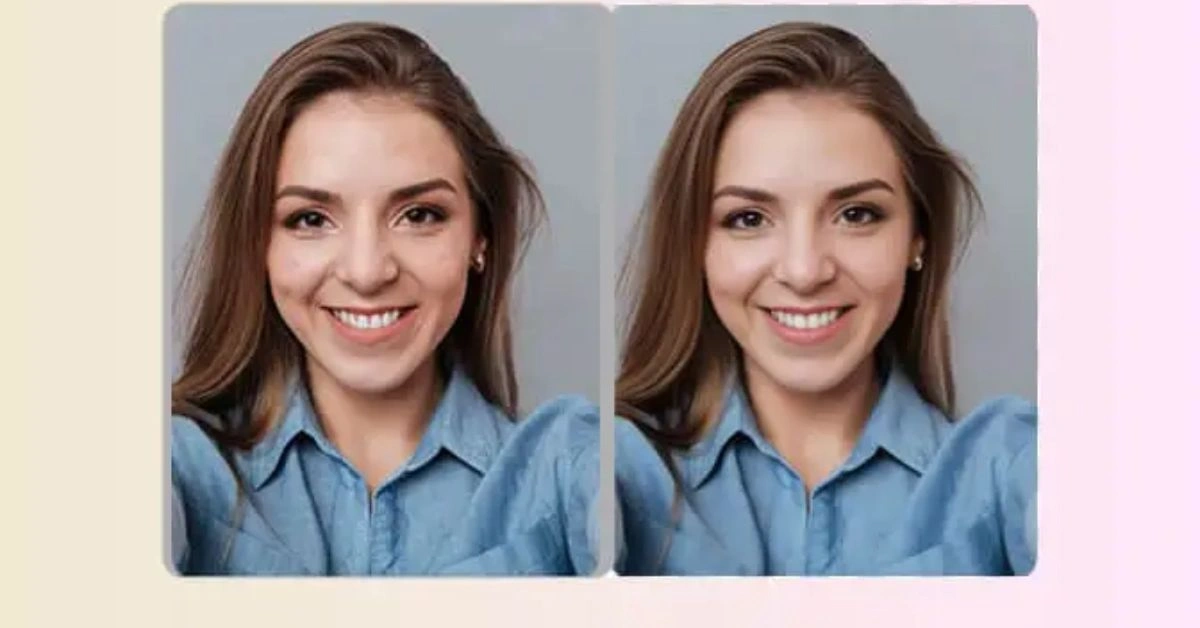
I’ve spent years hunched over a Wacom tablet in Photoshop, dodging and burning, masking layers, and chasing noise reduction sliders until my eyes crossed. A single high-ISO night shot or a scanned family heirloom could eat an entire afternoon. Today, AI tools deliver remarkably clean, detailed results in seconds or minutes. This isn’t hype—it’s a genuine shift in workflow that lets photographers, editors, and creators focus on vision rather than grunt work. But like any powerful tool, it demands understanding and restraint.
How AI Photo Enhancement Actually Works
Modern AI photo enhancement relies on deep learning, primarily convolutional neural networks (CNNs) and variants like denoising autoencoders or generative adversarial networks (GANs). These models train on massive datasets of paired images—clean vs. noisy, low-res vs. high-res, damaged vs. pristine—so they learn statistical patterns of what “good” images look like.
- Predicting missing pixels and upscaling: Traditional upscaling (bicubic interpolation) guesses new pixels by averaging neighbors, often producing soft or blocky results. AI models analyze context across the entire image. They recognize textures—fabric weave, skin pores, foliage—and “hallucinate” plausible high-frequency details based on learned examples. Tools can realistically upscale by 2x–4x or more while preserving sharpness.
- Noise reduction: AI denoising trains on noisy/clean pairs to distinguish signal from grain or speckles. It selectively reduces luminance and chrominance noise while protecting edges and fine detail. Unlike uniform filters, it adapts locally—aggressive on skies, gentler on textured areas.
- Color correction and restoration: Models infer plausible colors, fix white balance, and even handle demosaicing (reconstructing full color from sensor data). For old photos, they repair scratches, restore faded tones, and sharpen without introducing artifacts by drawing on broad visual knowledge.
In practice, I’ve tested tools like Topaz Photo AI, Let’s Enhance, and built-in options in Lightroom or Canon software. They often outperform manual methods on technical fixes, but the output quality depends heavily on the training data and the specific model’s strengths.
Real-World Use Cases
E-commerce Product Photos
Online sellers live or die by visuals. Low-res or poorly lit product shots kill conversions. AI upscalers and enhancers quickly boost resolution, remove dust/scratches, correct lighting inconsistencies, and ensure consistent backgrounds across a catalog. Tools like Let’s Enhance or CLAID.AI shine here for batch processing—upload hundreds of images and get optimized assets ready for Shopify or Amazon.
In my tests for client work, a mediocre phone shot of jewelry became crisp, color-accurate, and print-ready in under a minute. The time savings are massive, but always check for over-smoothed reflections or invented highlights that don’t match physical reality.
Historical Photo Restoration
Family archives and archival work benefit enormously. Old Polaroids, daguerreotypes, or water-damaged prints often suffer from scratches, fading, low resolution, and color shifts. AI restoration tools (Remini, Topaz, or specialized ones) detect and inpaint damage, recover detail, and colorize intelligently.
I’ve restored 1940s family portraits where AI recovered facial details and natural skin tones that would have taken days manually. The emotional impact is real—bringing ancestors back to life. However, for critical archival work, cross-reference with originals and use AI as a starting point.
Social Media Content Creation
Creators need fast, scroll-stopping visuals. AI handles quick fixes on smartphone shots: de-noising night images, sharpening portraits, expanding canvases for better composition, or enhancing colors for platform algorithms. Integrated tools in apps like Canva or mobile editors make this seamless.
For influencers or marketers, this means higher throughput without sacrificing perceived quality. But audiences are savvy—over-enhanced content can feel inauthentic.
The “Plastic Skin” Problem: Where Pure AI Fails Professional Standards
While generative upscaling tools boast impressive noise reduction, they introduce a distinct compliance issue for commercial print and high-end editorial work: structural hallucination. When processing low-resolution skin textures or fabric weaves, standard diffusion models often replace true camera noise with artificial, hyper-smooth patterns, colloquially known as the “plastic AI look.”
To pass quality control on major stock platforms or print networks, a hybrid workflow is non-negotiable. Instead of running a 100% AI pass, professionals use a targeted approach:
- Frequency Separation First: Isolate skin tones and textures manually.
- Blended Upscaling: Apply the AI enhancement layer at no more than 40-50% opacity over the original plate.
- Re-introducing Grain: Manually inject a uniform digital noise layer (0.5-1% Gaussian noise) over the final export to mask any smooth AI artifacts and bind the image textures cohesively.
The Limits of AI: When Enhancement Becomes Distortion
AI isn’t magic. It predicts based on probabilities, not true understanding. Common pitfalls I’ve encountered repeatedly:
- The plastic look: Aggressive skin smoothing or texture homogenization turns people into wax figures. Fine details like pores, hair strands, or fabric weave get averaged out.
- Hallucinated details: In upscaling or inpainting, AI can invent plausible-but-wrong elements—extra eyelashes, weird reflections, or inconsistent lighting. Complex scenes with text, patterns, or unusual subjects often fail subtly.
- Loss of authenticity: Historical restorations can introduce modern biases from training data. Over-sharpened or colorized images may look “better” but feel less true to the era.
- Over-reliance risk: Speed tempts skipping critical review. What looks great at thumbnail size can reveal artifacts zoomed in.
The human eye and creative intent still matter. AI excels at tedious technical lifts but lacks taste, context, and ethical judgment. Best results come from using it as a powerful assistant, not a replacement.
Balancing AI Automation with Human Creativity
AI photo enhancement has moved the bar from “good enough” to professional-grade much faster than before. It frees up hours for composition, lighting, storytelling—the parts that actually connect with viewers. Start with strong source material, apply targeted AI fixes, then refine manually in Photoshop or Lightroom for final polish. Experiment with different tools, zoom in critically, and always ask: Does this serve the story or the product?
The future isn’t AI doing everything—it’s skilled creators directing powerful tools with intention. Master both the tech and the craft, and you’ll produce work that stands out not because it’s AI-enhanced, but because it’s thoughtfully finished.
For More Information Visit AmgNews.