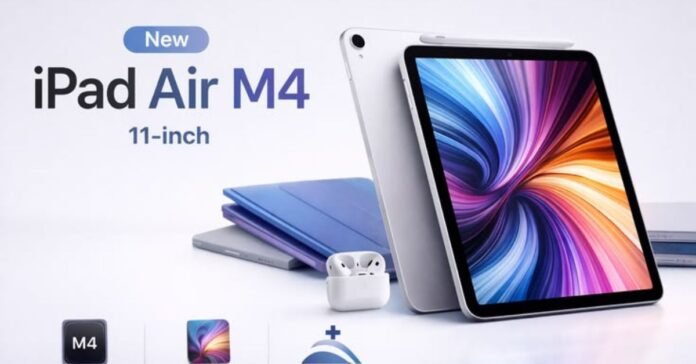


Apple’s latest iPad Air lineup—powered by the M4 chip in both 11-inch and 13-inch flavors—delivers flagship-level performance without the Pro price tag. These tablets are thin, stunning, and seriously capable for everything from casual streaming to serious creative work. But that premium build also means they’re vulnerable. One drop on concrete or a spilled coffee in a backpack, and you’re looking at costly repairs or a trip to the Genius Bar. That’s where the right iPad Air cases come in. They shield your investment while adding features that match how you actually use the device.
Whether you’re eyeing the compact 11-inch for portability or the expansive 13-inch for multitasking, protection isn’t optional—it’s essential. Good cases preserve resale value, maintain that premium feel, and often enhance usability with stands, Pencil support, and keyboard integration. Let’s break it down by real user needs and case categories so you can zero in on the perfect fit.
Matching iPad Air Cases to Your Lifestyle
Not everyone needs the same level of armor. The best iPad Air cases align with your daily grind.
Students: Backpacks are war zones. You want something lightweight yet tough enough for daily commutes, with easy stand modes for note-taking or watching lectures. Look for cases with Pencil storage that won’t snag on zippers and quick-access ports for charging between classes. Slim but protective options with multiple viewing angles shine here—think hybrid designs that won’t weigh down your bag.
Corporate Professionals: Sleek professionalism matters. You need cases that look polished in meetings, support keyboard attachments for productivity, and offer reliable auto-wake/sleep functionality. Folio-style cases in neutral colors or business-friendly textures keep things executive while protecting against desk dings and travel wear. Bonus if it has a secure Pencil holder for quick annotations on documents.
Digital Artists: Precision is everything. Cases must accommodate Apple Pencil Pro charging and hovering without interference, provide stable drawing angles (often near-flat or low-profile stands), and avoid adding too much bulk that throws off your grip during long Procreate sessions. Matte backs help with heat dissipation during intensive work, and easy detachment for direct tablet use is a plus.
Heavy-Duty Outdoor Workers: Construction sites, job sites, or fieldwork demand military-grade defense. These users prioritize rugged iPad Air cases with raised bezels, shock-absorbing corners, and sometimes even water/dust resistance. Port covers and reinforced stands that handle uneven surfaces make a huge difference when your iPad is a mobile command center.
Main Types of iPad Air Cases Evaluated
Here’s a rundown of the primary categories, with real-world pros, cons, and standout examples based on 2026 testing and user feedback.
Rugged/Drop-Proof Cases
These are the tanks. Multi-layer construction (often TPU + polycarbonate) with raised edges and corner cushions that survive 6-10 foot drops.
- Pros: Maximum protection, often with kickstands and port covers. Great for kids, travelers, or clumsy users.
- Cons: Bulkier and heavier; can feel less premium. Standouts: OtterBox Defender series for serious armor, or Zugu cases with their legendary multi-angle stands and grippy exteriors. Zugu strikes an impressive balance—not too thick but built like it means business.
Slim Folio Cases
The everyday heroes. Magnetic covers that double as stands, slim profiles that preserve the iPad Air’s sleekness.
- Pros: Lightweight, stylish options galore, excellent auto-wake/sleep magnets.
- Cons: Moderate drop protection—fine for careful users, not drops from height. Favorites: ESR Shift Magnetic or Apple’s own Smart Folio. Third-party versions often add more angles and Pencil storage at a lower price. Perfect for students and pros who want minimal added weight.
Keyboard/Productivity Cases
Transform your iPad Air into a laptop replacement. Detachable or attached keyboards with trackpads, backlit keys, and robust stands.
- Pros: Huge productivity boost, great for typing reports or emails on the go.
- Cons: Pricier and heavier; battery drain if backlit. Top pick: Logitech Combo Touch—reliable, adjustable, and highly rated for typing feel. Pairs beautifully with the M4’s power for split-screen workflows. Apple’s Magic Keyboard remains the premium benchmark but costs more.
Minimalist Clear Cases
Show off that Starlight, Space Gray, or new finish while adding basic scratch protection.
- Pros: Ultra-thin, crystal-clear to highlight the design, affordable.
- Cons: Limited drop protection; yellowing over time with cheaper plastics. Great for casual users or those who baby their gear. Brands like Spigen or basic ESR clear hybrids deliver precise fit without hiding the tablet’s beauty.
| Case Type | Best For | Drop Protection | Weight Added | Stand Angles | Price Range (USD) | Standout Feature |
| Rugged/Drop-Proof | Outdoor/Students | High (6-10ft) | Medium-High | 5-10+ | $40-80 | Shock-absorbing corners |
| Slim Folio | Pros/Daily Use | Medium | Low | 2-5 | $20-50 | Auto wake/sleep magnets |
| Keyboard/Productivity | Work/Creatives | Medium | Medium | Adjustable | $80-350 | Integrated trackpad/keyboard |
| Minimalist Clear | Casual/Style | Low-Medium | Very Low | 1-3 | $15-35 | Crystal transparency |
Key Buying Factors for iPad Air Cases
Don’t just grab the first one with good reviews. Focus on these must-haves for the 2026 M4 models (ensure compatibility with 11″ or 13″ specifically):
- Apple Pencil Charging Slot: Critical for Pro users. Look for magnetic or open designs that allow seamless wireless charging and Pro hover without removal. Side storage that doesn’t block the port is ideal.
- Precise Cutouts: Camera, speakers, USB-C, and buttons must align perfectly. Cheap cases often have sloppy tolerances that block mics or make volume buttons mushy.
- Auto-Wake/Sleep Magnet: Saves battery and prevents accidental screen wakes in your bag. Almost all quality folios have this—test it in-store if possible.
- Multi-Angle Viewing Stands: At least 2-3 stable positions (typing, drawing, media). Zugu and ESR excel with 8-10+ options for versatility.
- Materials and Build: TPU for flexibility and grip, microfiber lining to avoid scratches, raised lips for screen/camera protection. Check for MIL-STD drop ratings on rugged models.
- Size-Specific Fit: 11-inch vs 13-inch matters—camera bump placement and dimensions differ.
- Extras: Detachable inner shells, stylus loops, color options that won’t show dirt, and warranty length.
Budget $25-60 for solid everyday protection. Over $100 only if you need keyboard integration or extreme durability.
Wrapping It Up: Choose Cases That Match Your Flow
Your iPad Air is a versatile beast—don’t hobble it with a mismatched case. Students might lean toward versatile folios, creatives toward drawing-friendly designs, office warriors toward keyboard combos, and field pros toward rugged beasts. Prioritize real daily utility over hype: Does it protect where you need it most? Does it make using the tablet smoother? Test returns if buying online, and always verify the exact model compatibility (M4 2026 editions).
Shop around Amazon, Best Buy, or direct from makers like ESR, Zugu, and Logitech for the latest options. A great iPad Air case turns your tablet from a fragile slab into a confident daily driver. Protect it right, and it’ll serve you for years. What’s your setup—drop your go-to case in the comments if you’re already rocking one.
FAQS
Q1: Which iPad Air cases are best for the 2026 M4 models?
The top performers right now are Zugu cases for overall balance, ESR Shift Magnetic for versatility and value, OtterBox Defender for heavy protection, and Logitech Combo Touch for keyboard users. Always double-check compatibility with your specific 11-inch or 13-inch M4 iPad Air.
Q2: Do I really need a case for my iPad Air?
Yes. These tablets are thin, premium, and expensive to repair. A good case protects against drops, scratches, and daily wear while adding useful features like stands and Pencil storage.
Q3: What should I look for in an iPad Air case?
Key features include precise cutouts, strong auto wake/sleep magnets, Apple Pencil charging access, stable multi-angle stands, and good drop protection. Match the level of ruggedness to your lifestyle.
Q4: Are third-party iPad Air cases better than Apple’s Smart Folio?
Often yes. Brands like ESR and Zugu frequently offer more angles, better Pencil holders, stronger protection, and lower prices compared to Apple’s official options.
Q5: Which case is best for drawing and note-taking on iPad Air?
Slim folio or hybrid cases with low-angle stands (like ESR or MOFT) work great. They keep the Pencil easily accessible and don’t add too much bulk for comfortable grip during Procreate sessions.
Q6: How much should I spend on an iPad Air case?
$25–$60 gets you excellent everyday protection. Budget under $30 for basic slim cases, $50+ for rugged or keyboard options, and $150+ only if you want Apple’s premium Magic Keyboard.
Q7: Do clear iPad Air cases turn yellow over time?
Cheaper clear cases can yellow after 6–12 months. Go for higher-quality ones with anti-yellowing coating for better longevity.
For More Information Visit AmgNews.